· deepdives · 6 min read
Generic Sensor API vs. Proprietary Solutions: Which is the Better Choice?
A practical comparison of the W3C Generic Sensor API and vendor-specific sensor APIs, examining scalability, flexibility, performance, security, and vendor lock-in. Use the decision checklist and code examples to choose the right approach for your project.
Outcome first: by the end of this article you’ll have a clear, practical way to choose between the W3C Generic Sensor API and vendor-specific sensor APIs - and a checklist you can apply to your next project.
Why this matters. Sensors power modern apps: fitness trackers, AR glasses, IoT dashboards, and context-aware websites all rely on sensor data. Pick the wrong API and you spend months wrestling with integration, portability problems, or vendor lock-in. Pick the right one and you build faster, scale easier, and keep your options open.
The two contenders, in plain language
Generic Sensor API: a web-standard set of interfaces (accelerometer, gyroscope, ambient light, etc.) that aims to give browser-based code a consistent, permissioned way to read sensor data. It’s governed by W3C work and implemented in some browsers and platforms. W3C Generic Sensor API and MDN Sensor docs.
Proprietary sensor APIs: platform- or vendor-specific APIs such as Android’s Sensor Framework, Apple’s Core Motion / Core Location, device SDKs from wearable vendors (Fitbit, Garmin), or custom firmware interfaces for embedded devices. Examples: Android Sensors, Apple Core Motion, and vendor SDKs like Fitbit Web API.
Both provide sensor data. Their tradeoffs are where the decision lives.
Key comparison areas (what really affects projects)
1) Portability and cross-platform compatibility
Generic Sensor API: designed for cross-browser portability. Write once for compliant browsers and you get consistent behavior and permission models.
Proprietary APIs: platform-specific behavior and surface area. You’ll likely need separate implementations for Android, iOS, and vendor hardware.
Bottom line: Generic = easier cross-platform reuse. Proprietary = platform-optimized but fragmented.
2) Feature completeness and access to advanced hardware
Generic Sensor API: covers common sensors and offers a useful baseline. But it intentionally keeps the surface minimal to meet privacy and security goals.
Proprietary APIs: often expose advanced features (sensor calibration data, vendor-specific fused sensors, low-power hardware offload, precise timestamps, or custom metadata) before standards do.
Bottom line: When you need advanced data or special hardware features, proprietary wins.
3) Performance and power efficiency
Generic Sensor API: can be optimized by browsers, but there is an extra layer between your app and the hardware. For many use cases (UI-level motion effects, simple activity detection) it’s perfectly fine.
Proprietary APIs: provide lower-level access and often let you leverage platform-level power management (e.g., hardware batching, sensor hubs) for energy-sensitive applications.
Bottom line: For battery-critical, high-frequency, low-latency requirements, proprietary is often better.
4) Security, permissions, and privacy
Generic Sensor API: browsers implement standard permission prompts and often require secure contexts (HTTPS). It benefits from web platform privacy reviews and consistent UX.
Proprietary APIs: permission models vary by OS and vendor. Some provide finer-grained controls; others may be looser depending on platform policies.
Bottom line: Generic gives consistent, audited privacy behavior. Proprietary may give finer control-but also more variation to manage.
5) Scalability and maintenance cost
Generic Sensor API: one code path to maintain for web apps. Fewer platform-specific branches means lower long-term maintenance cost.
Proprietary APIs: different codebases for each platform increase testing and maintenance work, especially as vendors change their SDKs.
Bottom line: Generic scales better for multi-platform web apps. Proprietary scales better when device-specific behavior is required.
6) Vendor lock-in and product strategy
Generic Sensor API: reduces vendor lock-in. You can move a web-based product between hosting platforms and browsers more easily.
Proprietary APIs: adopt them and you may become dependent on vendor features, SDKs, or data formats. That can be fine when targeting a single ecosystem (e.g., an iOS-only app), but costly if you later expand.
Bottom line: Proprietary = higher lock-in risk; plan for abstraction if you choose it.
Decision matrix: When to choose which
Choose Generic Sensor API if:
- You’re building a cross-platform web app or PWA.
- You value portability and consistent permission UX.
- Your sensor needs are common (accelerometer, gyroscope, magnetometer, ambient light) and moderate in frequency.
- You want lower maintenance overhead and future-proofing.
Choose Proprietary API if:
- You need advanced hardware features (vendor fusion, raw sensor calibration, special timestamping).
- You need the absolute lowest latency or tight power management.
- You target a single platform and can accept vendor lock-in.
- You rely on vendor cloud services or analytics tightly integrated with their SDK.
Often the practical choice is hybrid: use a generic interface when possible and fall back on proprietary features where necessary.
Practical hybrid strategy (recommended for many projects)
- Start with Generic Sensor API (fast to prototype, good for broad compatibility).
- Measure. If you hit hard limits (latency, unavailable sensor metadata), implement a vendor-specific adapter for that feature.
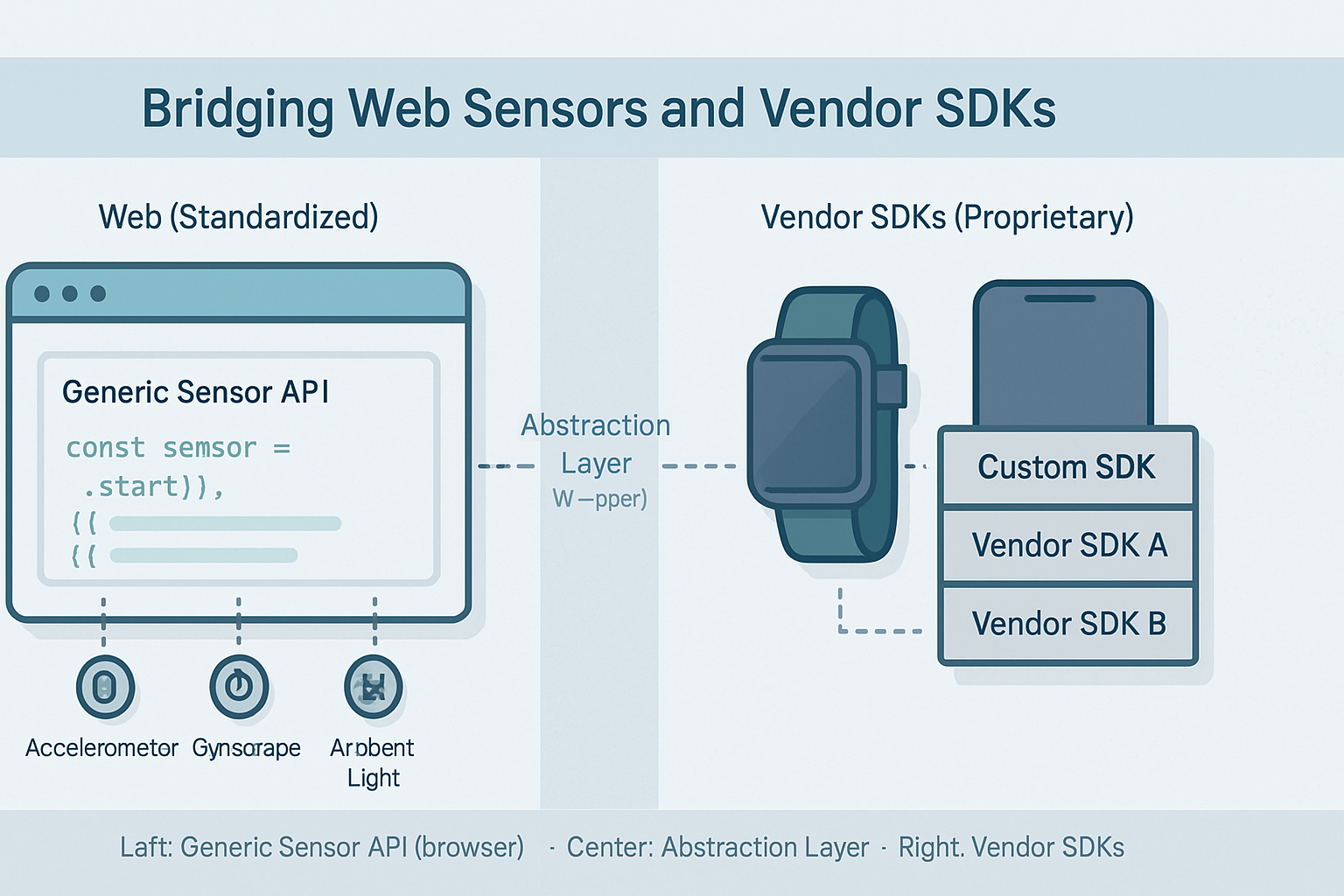
- Abstract sensor access behind a small wrapper in your app so switching or branching is minimal.
- Provide graceful degradation and feature-detection so the app still works with less-capable sensors.
Example: a lightweight wrapper in JavaScript
This example shows a simple pattern that uses the Generic Sensor API if available, and falls back to a hypothetical proprietary SDK (represented here as window.VendorSensor) if not.
// sensor-wrapper.js
class SensorWrapper {
  constructor() {
    this.sensor = null;
  }

  async init() {
    if ('Accelerometer' in window) {
      this.sensor = new Accelerometer({ frequency: 60 });
      await this._startGeneric();
    } else if (window.VendorSensor) {
      // Example vendor SDK usage (pseudo)
      this.sensor = new window.VendorSensor({ rate: 60 });
      await this._startVendor();
    } else {
      throw new Error('No supported sensor API available');
    }
  }

  _startGeneric() {
    return new Promise((resolve, reject) => {
      this.sensor.addEventListener('reading', () => {
        // normalize to common shape
        this.onreading({
          x: this.sensor.x,
          y: this.sensor.y,
          z: this.sensor.z,
        });
      });
      this.sensor.addEventListener('error', e => reject(e.error));
      this.sensor.start();
      resolve();
    });
  }

  _startVendor() {
    return new Promise(resolve => {
      this.sensor.on('data', d =>
        this.onreading({ x: d.ax, y: d.ay, z: d.az })
      );
      this.sensor.start();
      resolve();
    });
  }

  onreading(data) {
    // app-specific handler
    console.log('sensor', data);
  }
}
This wrapper isolates both APIs behind a common contract: the rest of your app only consumes normalized sensor data.
Testing and deployment considerations
- Feature detection: always detect at runtime. Don’t assume API presence.
- Permissions and UX: design for permission denial. Explain why sensor access improves the experience.
- Performance testing: run real-device tests (emulators aren’t enough) to measure latency and power.
- Fall-back behavior: if a proprietary feature is critical, document the acceptable alternatives.
Risk mitigation for proprietary adoption
- Abstract the vendor API behind an internal interface from day one.
- Isolate vendor-specific code so porting later is limited to the adapter layer.
- Document dependencies and estimate migration cost before committing to vendor-only features.
- Negotiate data portability and long-term support commitments with the vendor if the contract is possible.
Quick checklist to decide right now
- Is this a web app or PWA? If yes, start with Generic Sensor API.
- Do you need vendor-specific features (calibration, fused sensors, hardware offload)? If yes, plan a proprietary adapter.
- Is battery life and low latency a hard requirement? If yes, test proprietary paths early.
- Are you targeting multiple platforms? If yes, prefer generic first and add vendor-specific fallbacks.
Final recommendation
If your app must run across browsers and platforms, and your sensor needs are standard, prioritize the Generic Sensor API for faster development, consistent permission behavior, and lower maintenance. It gets you broad reach and less vendor lock-in. But don’t be dogmatic: when your product demands advanced features, tight power budgets, or specialized hardware access, use proprietary APIs - just do it behind an abstraction layer so you can swap or evolve your implementation later.
Choose pragmatically. Start generic. Add proprietary only where necessary. That approach gives you the best of both worlds: portability today, performance where it matters tomorrow.
References
- W3C Generic Sensor API: https://www.w3.org/TR/generic-sensor/
- MDN Web Docs - Sensor APIs: https://developer.mozilla.org/en-US/docs/Web/API/Sensor
- Android Sensors Overview: https://developer.android.com/guide/topics/sensors
- Apple Core Motion: https://developer.apple.com/documentation/coremotion
- Fitbit Web API (example vendor API): https://dev.fitbit.com/build/reference/web-api/