· career · 7 min read
Beyond Syntax: Key Concepts to Master for JavaScript Whiteboard Interviews
A practical guide to the core JavaScript concepts you need to explain and demonstrate in whiteboard interviews: closures, scope & hoisting, 'this', prototypes, asynchronous programming, and the event loop-plus how to present solutions clearly on the board.
Outcome-first introduction
Start here: after reading this article you’ll be able to clearly explain and sketch the JavaScript concepts interviewers expect - closures, the event loop, asynchronous patterns (callbacks, promises, async/await), scope & hoisting, prototypes and inheritance, and higher-order functions - and demonstrate them on the whiteboard with confidence. You’ll also get a reproducible whiteboard approach and a handful of sample problems you can practice explaining out loud.
Why this matters
Interviewers aren’t just checking whether you can type code. They want to know you understand behavior: why a closure captures a variable, why a promise resolves after a setTimeout, or how prototype lookup affects method dispatch. Demonstrating conceptual depth separates candidates who know syntax from candidates who can reason about real systems.
How to use this guide
When practicing: explain first, draw or write a small example, demonstrate a pitfall, then state the time/space complexity and an edge case or two.
Core concept: Closures
What it is (short): A closure is a function plus its lexical environment. A function “remembers” the variables from the scope where it was created.
How to show it on the board
- Draw two boxes: outer scope and inner function scope. Show the inner function having a pointer to the outer variables.
- Write a tiny example:
function makeCounter() {
  let count = 0;
  return function () {
    // closure captures `count`
    count += 1;
    return count;
  };
}
const c = makeCounter();
console.log(c()); // 1
console.log(c()); // 2
Pitfalls and talking points
- Closures can capture references to mutable objects - explain when that matters.
- Memory: closures keep referenced variables alive; be mindful of long-lived closures holding large objects.
- Common interview prompt: implement a function that returns an array of functions and explain why naive loops trip people (closure over loop variable). Show correct solutions (use let or IIFE).
References: MDN on closures: https://developer.mozilla.org/en-US/docs/Web/JavaScript/Closures
Core concept: Scope, Hoisting & Temporal Dead Zone
Short recap
- var is function-scoped and hoisted (initialized to undefined).
- let/const are block-scoped and have a Temporal Dead Zone (TDZ) until their declaration is evaluated.
Illustrative code
console.log(a); // undefined (var hoisted)
var a = 2;

console.log(b); // ReferenceError (TDZ)
let b = 3;
Whiteboard tip: draw timelines for code execution to explain when declarations are created vs. initialized.
Reference: Hoisting (MDN): https://developer.mozilla.org/en-US/docs/Glossary/Hoisting
Core concept: this, call/apply/bind and arrow functions
Short explanation
- this is determined by how a function is called, not where it’s defined (except arrow functions).
- Arrow functions don’t have their own this; they capture the this from the surrounding lexical scope.
Examples to write
const obj = {
  x: 10,
  getX() {
    return this.x;
  },
};
obj.getX(); // 10

const detached = obj.getX;
detached(); // undefined or global depending on strict mode

const bound = detached.bind(obj);
bound(); // 10

// Arrow function
const arrow = () => this; // `this` here is lexical
Interview tip: draw call sites. Show method call vs. plain function call vs. bound function.
Reference: MDN on this: https://developer.mozilla.org/en-US/docs/Web/JavaScript/Reference/Operators/this
Core concept: Prototypes and Inheritance
Compact explanation
- JavaScript objects inherit via the prototype chain. Each object has an internal prototype link (shown as [[Prototype]]).
- Functions have a prototype property used when creating objects with new.
Whiteboard demo
- Draw an object with a pointer to its prototype, and the prototype’s pointer to Object.prototype.
- Write a quick example:
function Person(name) {
  this.name = name;
}
Person.prototype.greet = function () {
  return `Hi ${this.name}`;
};
const p = new Person('Sam');
console.log(p.greet()); // 'Hi Sam'
Talk about: property lookup order, shadowing, and how Object.create differs from new.
Reference: Prototypes: https://developer.mozilla.org/en-US/docs/Web/JavaScript/Inheritance_and_the_prototype_chain
Core concept: Higher-order functions, Currying and Composition
Why it matters
Modern JS uses functions as first-class values. Interviewers expect fluency with map/filter/reduce, function composition and currying.
Board sample
- Implement a simple curry function or show how to curry add:
const add = a => b => a + b;
add(2)(3); // 5- Show reduce used to implement map or flatMap (good for demonstrating algorithmic thinking).
Talking point: Purity and immutability-explain why side-effect-free helpers make code easier to reason about.
Core concept: Asynchronous JavaScript - callbacks, promises, async/await
Short framing
Understand the history and how each abstraction addresses callback hell.
Write and explain
- Callback example (and its pitfall): nested callbacks and inversion of control.
- Promise example:
fetch('/data')
  .then(r => r.json())
  .then(data => console.log(data))
.catch(err => console.error(err));- async/await example:
async function getData() {
  try {
    const r = await fetch('/data');
    const data = await r.json();
    return data;
  } catch (err) {
    throw err;
  }
}
Interview emphasis
- Be able to implement a simple promise polyfill or a Promise.all/Promise.race sketch.
- Discuss error propagation and why try/catch around await is necessary.
References: Promises and Async/Await (MDN):
- Promises: https://developer.mozilla.org/en-US/docs/Web/JavaScript/Guide/Using_promises
- Async/Await: https://developer.mozilla.org/en-US/docs/Learn/JavaScript/Asynchronous/Async_await
Core concept: The Event Loop, microtasks vs macrotasks
Why this can make or break interviews
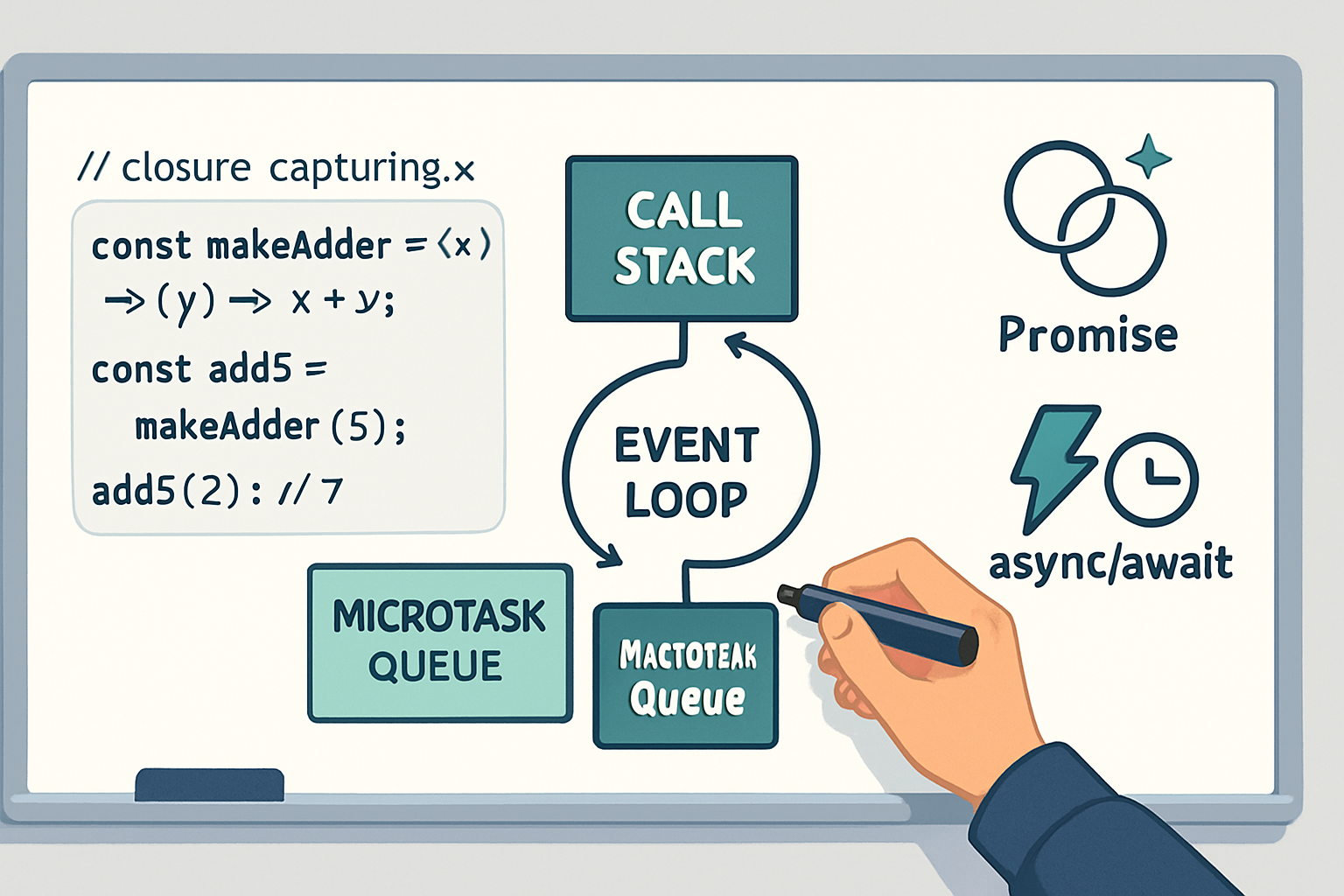
Many gotchas in async JS come from misreading the event loop. Being able to draw the queue model and explain ordering is essential.
Concrete demonstration to draw
- Draw the call stack, task queue (macrotasks) and microtask queue.
- Explain: microtasks (Promise callbacks, queueMicrotask) run after the current stack but before the next macrotask (setTimeout, setInterval, I/O callbacks).
Example to write and explain
console.log('start');
setTimeout(() => console.log('timeout'), 0);
Promise.resolve().then(() => console.log('promise'));
console.log('end');
// Output: start, end, promise, timeout
References:
- MDN Event Loop: https://developer.mozilla.org/en-US/docs/Web/JavaScript/EventLoop
- Tasks vs microtasks (deep dive): https://jakearchibald.com/2015/tasks-microtasks-queues-and-schedules/
Core concept: Performance, Memory and Complexity
What to state quickly in interviews
- Big O time/space for your solution.
- If you create many temporary arrays or keep references in closures, mention memory implications.
- Mention algorithmic improvements (e.g., use hashmap to reduce O(n^2) to O(n)).
Whiteboard habit: always state complexity after writing an algorithm. If you can optimize, sketch how and trade-offs.
Common whiteboard problems and how to approach them
- Implement debounce (typical async + event handling)
- Explain intent, write a concise implementation using setTimeout, note behavior when immediate option is chosen.
- Implement Promise.all
- Walk through waiting for N results, collecting in array, and rejecting early on error.
- Flatten nested arrays
- Show recursive vs iterative, discuss stack depth and tail recursion concerns.
- Event delegation
- Explain adding a single listener to a parent and using event.target to route - mention performance benefit for many children.
- Implement a simple LRU cache
- Discuss data structure choices (hashmap + doubly linked list) and complexity guarantees.
For each problem: clarify requirements, show correctness with an example, analyze complexity, discuss edge cases.
How to present solutions on the whiteboard (repeatable structure)
- Clarify the problem and constraints out loud.
- Ask for and state assumptions (input types, expected errors, memory/time constraints).
- Sketch data structures and flow (diagrams matter).
- Write readable pseudocode or minimal real JS code.
- Walk through an example by hand to prove correctness.
- State complexity and potential trade-offs.
- Mention edge cases and tests.
Practical communication tips
- Narrate your thoughts. Silence looks like you’re stuck; talk through trade-offs.
- If you make a small mistake, acknowledge and fix it - interviewers value recovery.
- Use consistent naming and small helper functions; it makes your logic easier to follow.
- Timebox: if stuck for too long, propose a correct brute-force path and then discuss optimizations.
Sample whiteboard walkthrough: Promise.all (concise)
- Clarify: accepts array of promises/values, returns promise that resolves to results array or rejects on first failure.
Sketch code:
function promiseAll(promises) {
  return new Promise((resolve, reject) => {
    const results = [];
    let count = 0;
    promises.forEach((p, i) => {
      Promise.resolve(p).then(v => {
        results[i] = v;
        count += 1;
        if (count === promises.length) resolve(results);
      }, reject);
    });
  });
}- Complexity: O(n) time (plus whatever underlying promises do) and O(n) space for results.
Final checklist before an interview
- Can you explain closures with a diagram? Yes.
- Can you sketch the event loop and explain microtask order? Yes.
- Can you implement common utilities (debounce, throttle, Promise.all, curry) and discuss complexity? Yes.
- Can you explain ‘this’, prototype lookup, hoisting, and TDZ? Yes.
Parting emphasis
Mastering syntax is table stakes. The difference-maker is being able to reason about behavior: variable lifecycle (closures/TDZ), invocation model (this/prototypes), and time-ordering (event loop/microtasks). Practice explaining these with diagrams and small examples, and treat the whiteboard as a tool to make your mental model visible. When you can do that, interviewers will see not just that you can write JavaScript, but that you understand how it works.
References
- MDN: Closures - https://developer.mozilla.org/en-US/docs/Web/JavaScript/Closures
- MDN: Event Loop - https://developer.mozilla.org/en-US/docs/Web/JavaScript/EventLoop
- MDN: Using Promises - https://developer.mozilla.org/en-US/docs/Web/JavaScript/Guide/Using_promises
- MDN: Async/Await - https://developer.mozilla.org/en-US/docs/Learn/JavaScript/Asynchronous/Async_await
- MDN: Prototypes & Inheritance - https://developer.mozilla.org/en-US/docs/Web/JavaScript/Inheritance_and_the_prototype_chain
- Jake Archibald: Tasks, microtasks, queues and schedules - https://jakearchibald.com/2015/tasks-microtasks-queues-and-schedules/