· frameworks · 7 min read
Unraveling the Mysteries of Qwik: How it Compares to Other Frameworks
A practical, comparative guide to Qwik and how it stacks up against React, Vue, and Angular - covering architecture, performance, ergonomics, pitfalls, and when Qwik is the right choice for your project.
Outcome first: after reading this you’ll be able to decide-confidently-when Qwik gives you real user-perceived performance gains over React, Vue, or Angular, and when the costs outweigh the benefits.
Why this matters (and what you’ll get)
Fast pages are not just about TTFB. They’re about time-to-interactive (TTI), first input delay, and perceived snappiness for real users on real devices and networks. Qwik promises a very different approach to minimize JavaScript shipped and executed on the client through a concept called “resumability” and deep lazy-loading. This article explains what that means in practice, compares Qwik to React, Vue, and Angular, and gives you a practical decision checklist.
Quick primer: what’s special about Qwik?
- Resumability: instead of hydrating a server-rendered app by re-running the app code in the browser, Qwik serializes the application’s state and event wiring into the HTML so the app can “resume” in place without a full JavaScript boot sequence. See Qwik’s docs on resumability for full details: https://qwik.builder.io/docs/intro/resumability/
- Fine-grained lazy-loading: Qwik breaks your app into many tiny pieces (down to event handlers) and only loads code when needed. This reduces the amount of code parsed and executed on initial load.
- QRLs (Qwik Resource Locators): references that point to code that can be loaded later; they are how Qwik marks code for lazy loading.
- Qwik City: a meta-framework for routing and server-side behavior similar to Next.js for the Qwik ecosystem: https://qwik.builder.io/qwik-city/
If you want the high-level takeaway: Qwik optimizes for the fastest possible first interaction by avoiding the initial JavaScript boot cost typical in traditional SSR + hydration apps.
How Qwik differs architecturally from React, Vue, and Angular
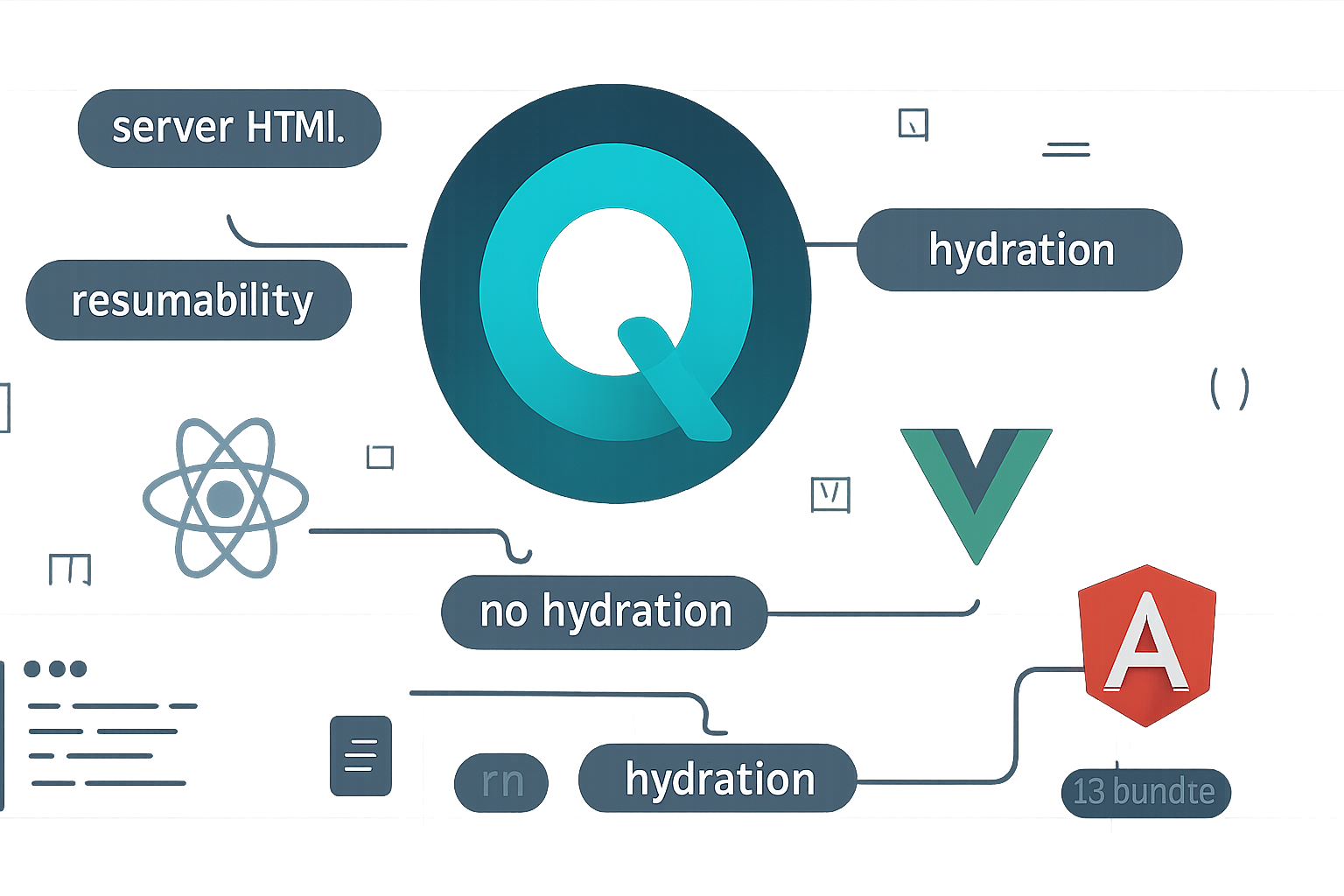
- React / Vue / Angular (typical SSR + hydration): server renders HTML, sends it to the client, then runs framework code to “hydrate” components - reattach event listeners and get the app into an interactive state. Hydration usually requires executing a sizable portion of app code on the client.
- Qwik (resumability): server renders HTML and embeds the minimal metadata necessary to resume each component’s runtime without bootstrapping the entire app. Code is loaded on-demand when a user interacts or when navigation requires it.
Important comparison pages:
- React docs: https://reactjs.org/docs/getting-started.html
- Vue docs: https://vuejs.org/guide/introduction.html
- Angular docs: https://angular.io/docs
- Qwik docs/components: https://qwik.builder.io/docs/components/
Concrete example: a tiny interactive component
Qwik (simplified):
// Counter.tsx
import { component$, useStore } from '@builder.io/qwik';

export default component$(() => {
  const state = useStore({ count: 0 });
  return (
    <button onClick$={() => (state.count += 1)}>Count: {state.count}</button>
  );
});
Notes:
component$andonClick$mark functions and handlers as serializable/lazy-loadable. Qwik’s compiler and runtime use that to split and load precisely what is needed.
React (for comparison):
// Counter.jsx
import { useState } from 'react';

export default function Counter() {
  const [count, setCount] = useState(0);
  return <button onClick={() => setCount(c => c + 1)}>Count: {count}</button>;
}
Notes:
- React’s component must run on the client (or be hydrated) to become interactive. Hydration implies code execution for the component tree.
Strengths of Qwik - where it really shines
- Extremely low client boot cost
- For content-heavy pages with sparse interactivity, Qwik can deliver near-instant time-to-interactive because most JavaScript remains unloaded until needed.
- Predictable lazy-loading behavior
- Fine-grained splitting makes it easier to reason about which code is loaded for which interaction.
- Better cold-device performance
- Low memory and CPU overhead on slow devices (e.g., low-end phones) because script parsing/execution is minimized.
- SEO and initial paint
- Because HTML is server-rendered, pages are crawlable and paint quickly; combined with deferred JS it’s a win for both SEO and perceived performance.
- Great for very large pages with lots of independent interactive widgets
- Examples: news sites, e-commerce pages with many widget components, marketing pages with progressive interactivity.
Potential pitfalls and trade-offs
- Smaller ecosystem and fewer 3rd-party integrations
- The Qwik ecosystem is younger. Many libraries are built for React/Vue and may not work out-of-the-box.
- Mental model and learning curve
- Concepts like QRLs, explicit
$marking (component$, onClick$), and resumability are unfamiliar to many developers and require different debugging approaches.
- Concepts like QRLs, explicit
- Tooling and debugging maturity
- Tooling (profilers, dev tools, third-party integrations) is catching up but not as mature as React/Vue/Angular ecosystems.
- Overhead for small apps
- If your app is small, interactive, and served to capable devices, the benefit of Qwik’s extreme optimization may be negligible; the cost of adopting a new framework may not justify the gains.
- Interop friction
- Many npm libraries assume a traditional CSR/SSR/hydration lifecycle and direct access to framework lifecycles; integrating them may need glue code or reimplementation.
Side-by-side comparison (short)
- Performance (TTI on slow networks/devices): Qwik > React/Vue/Angular for content-heavy apps with sparse interactivity.
- Developer familiarity and ecosystem: React/Vue/Angular >> Qwik - especially React and Vue for components and tooling.
- App complexity: Angular excels for large, enterprise apps needing DI, strict structure, and a full-featured framework. Qwik excels for ultra-fast websites and large pages with many widgets.
- SSR/SEO: All support SSR and SEO well; Qwik’s resumability gives the best client behavior after SSR by avoiding hydration costs.
When to choose Qwik - practical decision checklist
Choose Qwik when:
- You need the fastest possible time-to-interactive on low-end devices and slow networks.
- Your pages are content-heavy and include many independent interactive pieces (portals, widgets, comments, carousels) that don’t all need to be interactive at once.
- You’re building a high-scale marketing or editorial site, or an e-commerce catalog where initial interaction speed can directly impact conversion.
- You accept a newer ecosystem to achieve measurable user-perceived performance gains.
Avoid Qwik (or be cautious) when:
- Your team has deep expertise in React/Vue/Angular and delivery time is more important than performance micro-optimizations.
- You must use many third-party libraries that only exist for React or Vue and can’t be swapped or adapted easily.
- You’re building a small internal tool or admin dashboard where initial payload is small and developer productivity matters more than tiny runtime wins.
Migration and hybrid strategies
- Incremental adoption: consider wrapping isolated parts of a larger site in a Qwik-powered widget (if your hosting and build system allow), but be mindful of interop complexity.
- Rethink third-party dependencies: if a critical library is only for React, evaluate porting, replacing, or running a minimal React microfrontend where necessary.
Developer ergonomics and DX
- Qwik’s syntax (component$, onClick$, loader$) makes lazy boundaries explicit. That can be liberating (you control granularity) - but it also requires discipline to avoid overcomplicating component APIs.
- Debugging resumable apps demands different mental models: instead of “why didn’t hydration run?” you’ll ask “why wasn’t this QRL requested?” and look into serialized markers in the HTML.
Real-world use cases where Qwik shines
- Large editorial sites with many ads, comment widgets, and interactive elements that do not need to be active on initial load.
- Marketplaces or product catalog pages where the majority of users browse and only sometimes interact with specific items.
- Landing pages and marketing sites where initial load and conversion speed are critical.
When other frameworks make more sense
- React: unmatched ecosystem, mature libraries, and broad hosting and team knowledge. Prefer React for rapid product development, complex UIs backed by many mature libraries, and when you need predictable runtime behavior.
- Vue: great for progressive adoption and approachable API. Choose Vue for teams valuing simplicity and fast onboarding.
- Angular: best for large enterprises that benefit from opinionated structure, DI, and built-in tooling. Choose Angular when you need the battery-included approach and strict architecture.
Final recommendations - a pragmatic approach
- Measure first: add real user monitoring (RUM) and lab tests (Lighthouse) to identify if hydration or JS boot time is a bottleneck.
- Prototype: build a minimal, critical path page in Qwik and compare TTI, JS parsed/executed, and developer effort to your current stack.
- Evaluate ecosystem risk: list essential libraries and integrations; confirm compatibility or feasible alternatives.
- Start small: prototype interactive widgets in Qwik for pages where performance matters most.
Resources
- Qwik official site and docs: https://qwik.builder.io/
- Qwik resumability docs: https://qwik.builder.io/docs/intro/resumability/
- Qwik City (routing & meta-framework): https://qwik.builder.io/qwik-city/
- React docs: https://reactjs.org/docs/getting-started.html
- Vue docs: https://vuejs.org/guide/introduction.html
- Angular docs: https://angular.io/docs
Qwik brings a bold idea - resume instead of hydrate - and that idea maps directly to better real-world performance in the right scenarios. But it’s not a silver bullet: weigh ecosystem, team skills, and integration costs against the user-perceived gains. If your performance budgets are tight and your pages are large and interactive only in parts, Qwik deserves serious consideration.